CAMPUS LAYERS
3D-GIS-AR Integrated Tool
UX Case Study
SaaS Product
ED-Tech MS
Live Project
Enhancing User Experience of Campuses
Enhancing User Experience of Campuses
Enhancing User Experience of Campuses

Project Type
Project Type
Industry Sponsored Live UX Research and Design Project
My Role
My Role
Project Planning
User Research
Ideations
Prototyping
Duration
Duration
3 Months
Tools Used
Tools Used

So what’s The Problem.
So what’s The Problem.
So what’s The Problem.
Lost in endless corridors, delayed by unclear schedules, and frustrated by poor communication — navigating campus life shouldn’t feel like solving a maze. From students searching for classrooms to staff juggling facility management and visitors feeling stranded, the campus experience is often chaotic and inefficient. These persistent challenges demand a smarter, more intuitive solution to bring clarity, control, and convenience to everyone on campus.
Lost in endless corridors, delayed by unclear schedules, and frustrated by poor communication — navigating campus life shouldn’t feel like solving a maze. From students searching for classrooms to staff juggling facility management and visitors feeling stranded, the campus experience is often chaotic and inefficient. These persistent challenges demand a smarter, more intuitive solution to bring clarity, control, and convenience to everyone on campus.
And the Crafted Solution.
And the Crafted Solution.
And the Crafted Solution.
To address these challenges, we designed Campus Layer — a comprehensive web application that simplifies navigation, enhances real-time communication, and streamlines campus resource management. By integrating GIS-AR-3D visualization, actionable dashboards, and multilingual support, the solution empowers students, staff, and visitors with intuitive tools to navigate, manage, and engage with campus life seamlessly.
To address these challenges, we designed Campus Layer — a comprehensive web application that simplifies navigation, enhances real-time communication, and streamlines campus resource management. By integrating GIS-AR-3D visualization, actionable dashboards, and multilingual support, the solution empowers students, staff, and visitors with intuitive tools to navigate, manage, and engage with campus life seamlessly.
Integration of
Integration of
AR
AR
AR
GIS
GIS
GIS

3D
3D
3D
Curious? How We Reached? Lets dive deep...
Curious? How We Reached?
Lets dive deep...
Curious? How We Reached? Lets dive deep...
Research & Design Framework
Research & Design Framework
NEEDS, PAINS, GOALS
NEEDS, PAINS, GOALS
NEEDS, PAINS, GOALS
FINDINGS
FINDINGS
FINDINGS
SIMPLIFYING THE USER FLOWS
SIMPLIFYING THE USER FLOWS
SIMPLIFYING THE USER FLOWS
USER TESTING & IMPLEMENTATION
USER TESTING & IMPLEMENTATION
USER TESTING & IMPLEMENTATION
Observational Study
Observational Study
Observational Study
SURVEYS
SURVEYS
SURVEYS
INTERVIEWS
INTERVIEWS
INTERVIEWS
Development of THE UI/UX
Development of THE UI/UX
Development of THE UI/UX
Primary Research
Primary Research
Primary Research
ANALYSIS OF EXISTING UX/UI
ANALYSIS OF EXISTING UX/UI
ANALYSIS OF EXISTING UX/UI
USER JOURNEY
USER JOURNEY
USER JOURNEY
USABILITY TESTING
USABILITY TESTING
USABILITY TESTING
USER FLOWS OF PERSONAS
USER FLOWS OF PERSONAS
USER FLOWS OF PERSONAS
Competitor Analysis
Competitor Analysis
Competitor Analysis
HEURISTICS EVALUATION
HEURISTICS EVALUATION
HEURISTICS EVALUATION
TOUCHPOINTS ANALYSIS
TOUCHPOINTS ANALYSIS
TOUCHPOINTS ANALYSIS
EXPERIENCE MAP
EXPERIENCE MAP
EXPERIENCE MAP
INFORMATION ARCHITECTURE
INFORMATION ARCHITECTURE
INFORMATION ARCHITECTURE
WIREFRAMES
WIREFRAMES
WIREFRAMES
PROTOTYPES
PROTOTYPES
PROTOTYPES
Review of Literatures and Secondary Research
Review of Literatures and Secondary Research
Review of Literatures and Secondary Research
Here the Digging Started.
Here the Digging Started.
Here the Digging Started.
Competitor Analysis
Competitor Analysis
Open source
Open source
Open source
User friendly
User friendly
User friendly
Advanced GIS features
Advanced GIS features
Advanced GIS features
Customisable
Customisable
Customisable
Handles large datasets
Handles large datasets
Handles large datasets
Cloud based
Cloud based
Cloud based
Mobile version
Mobile version
Mobile version
Spatial analysis
Spatial analysis
Spatial analysis
GRASS GIS
GRASS GIS
GRASS GIS
OpenLayers
OpenLayers
OpenLayers
SuperGeo
SuperGeo
SuperGeo
SAGA GIS
SAGA GIS
SAGA GIS
PostGIS
PostGIS
PostGIS
ArcGIS
ArcGIS
ArcGIS
QGIS
QGIS
QGIS
Existing UX/UI Analysis
Existing UX/UI Analysis

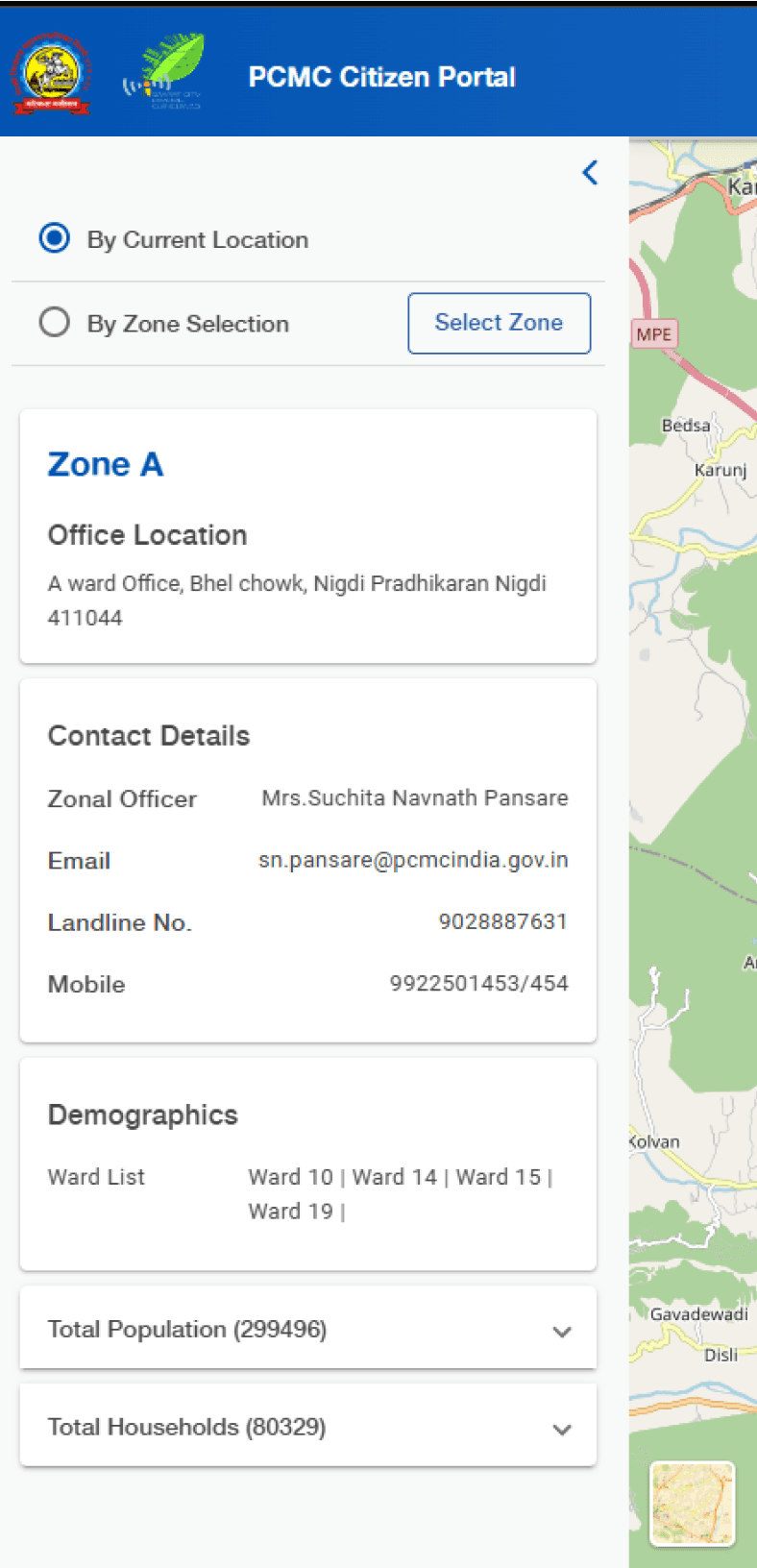

1
1
City Layers UI Analysis
City Layers UI Analysis
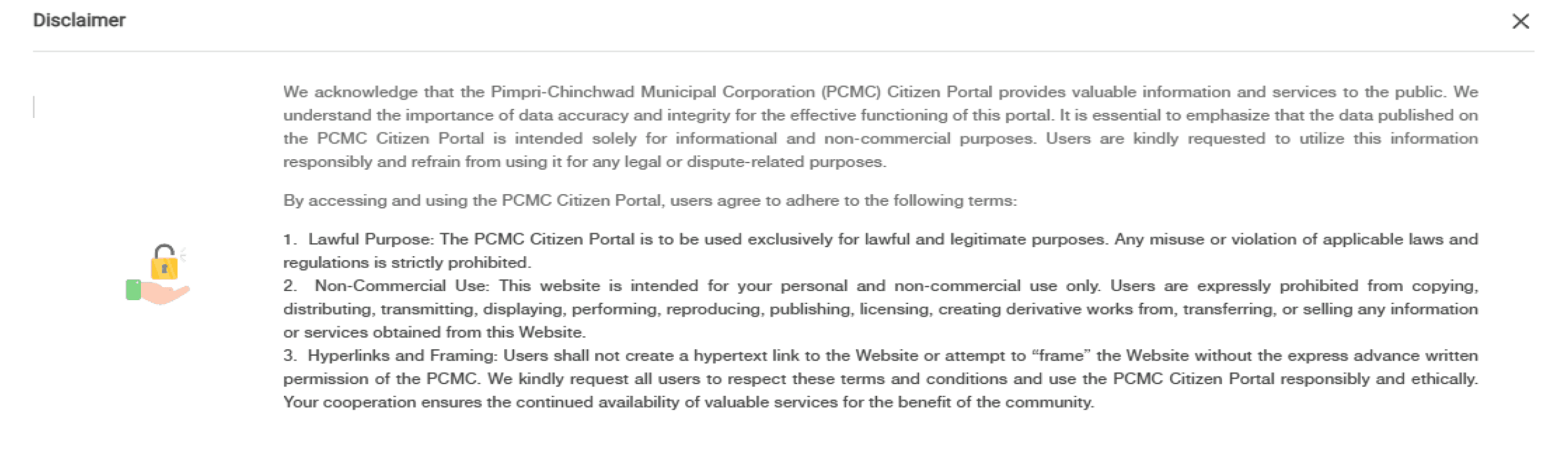
Text Readability & Engagement
Font size (12px) is too small for comfortable reading, especially for text-heavy content like disclaimers.
Text lacks engaging language, reducing user motivation to explore the portal.
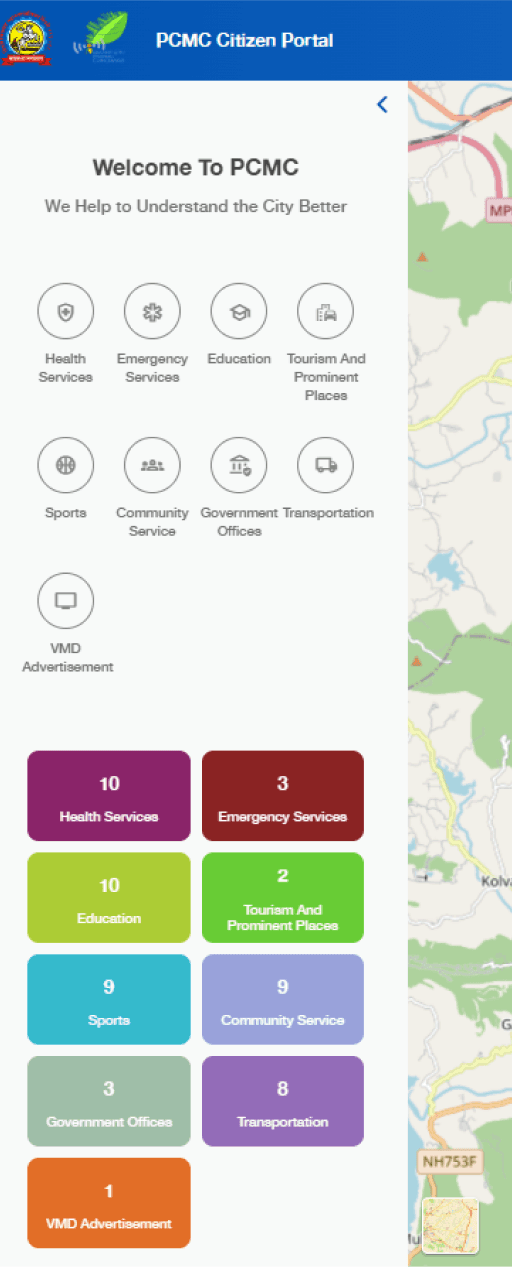
Dashboard Hierarchy & Visual Structure
The dashboard does not follow a clear visual hierarchy, making navigation challenging.
Inconsistent color usage creates visual confusion.
Navigation & Feedback
Absence of a back button limits user control.
No clear indication of the current page reduces navigation clarity.
Typography Consistency
Multiple font sizes disrupt the visual hierarchy.
Inconsistent typefaces across pages create a fragmented experience.
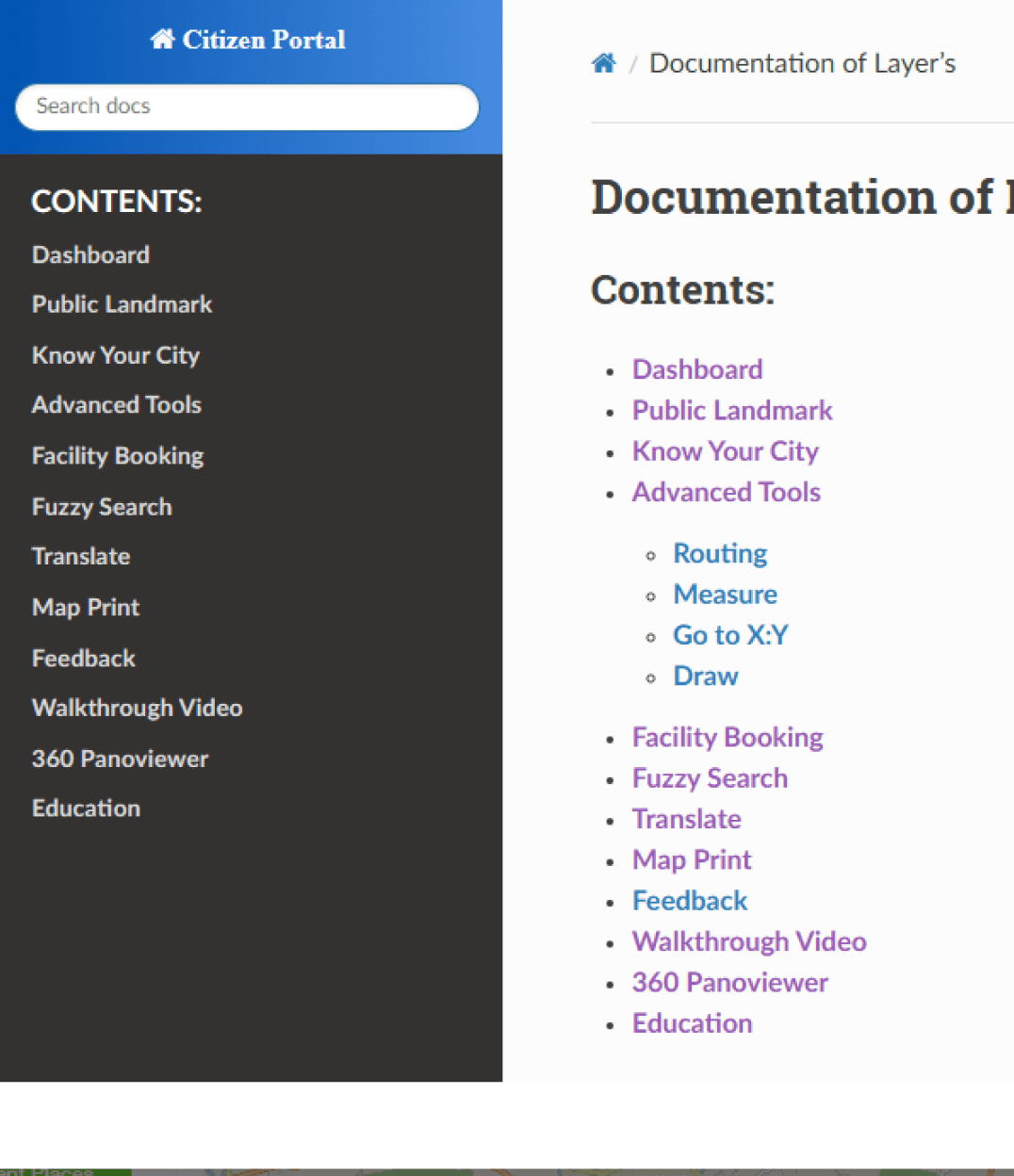
Help Documentation Accessibility
Help documentation contains complex technical language that may confuse non-technical users.
Redundant index entries create clutter and confusion.
Text Readability & Engagement
Font size (12px) is too small for comfortable reading, especially for text-heavy content like disclaimers.
Text lacks engaging language, reducing user motivation to explore the portal.
Dashboard Hierarchy & Visual Structure
The dashboard does not follow a clear visual hierarchy, making navigation challenging.
Inconsistent color usage creates visual confusion.
Navigation & Feedback
Absence of a back button limits user control.
No clear indication of the current page reduces navigation clarity.
Typography Consistency
Multiple font sizes disrupt the visual hierarchy.
Inconsistent typefaces across pages create a fragmented experience.
Help Documentation Accessibility
Help documentation contains complex technical language that may confuse non-technical users.
Redundant index entries create clutter and confusion.
This is good, But who are the Audience?
This is good, But who are the Audience?
This is good, But who are the Audience?
User Classes
User Classes
Student
Student
Staff
Staff
Visitor
Visitor
This project is specifically for Sanskardham Campus that hosts diverse users with unique needs: students require academic resources and updates; staff, including admin, faculty, and facility managers, need efficient management tools; and visitors like guest faculty and event attendees seek clear navigation and information.
Understanding these varied user groups is crucial in designing solutions that address their specific challenges and enhance their overall campus experience.
This project is specifically for Sanskardham Campus that hosts diverse users with unique needs: students require academic resources and updates; staff, including admin, faculty, and facility managers, need efficient management tools; and visitors like guest faculty and event attendees seek clear navigation and information.
Understanding these varied user groups is crucial in designing solutions that address their specific challenges and enhance their overall campus experience.
What we found from Audience?
What we found from Audience?
What we found from Audience?
Navigation Challenges
Navigation Challenges
High prevalence of navigation issues (80% rely on interpersonal help).
Need for intuitive tools like interactive maps and building directories.
High prevalence of navigation issues (80% rely on interpersonal help).
Need for intuitive tools like interactive maps and building directories.
Maintenance Reporting
Maintenance Reporting
Inefficient current methods (66% use manual reporting).
Demand for streamlined digital reporting with status tracking.
Inefficient current methods (66% use manual reporting).
Demand for streamlined digital reporting with status tracking.
Real-Time Updates
Real-Time Updates
Strong demand for real-time updates (90% occasionally or frequently need them).
Interest in live data for cafeteria menus, mess crowd levels, and transport schedules.
Strong demand for real-time updates (90% occasionally or frequently need them).
Interest in live data for cafeteria menus, mess crowd levels, and transport schedules.
User Priorities
User Priorities
Emphasis on real-time data, better coordination, and faster responses.
Openness to centralized platforms but requires user education to address hesitation.
Emphasis on real-time data, better coordination, and faster responses.
Openness to centralized platforms but requires user education to address hesitation.
Overall Experience
Overall Experience
Users seek a unified system to enhance navigation, updates, and resource management.
Users seek a unified system to enhance navigation, updates, and resource management.
Information Access
Information Access
Heavy reliance on informal sources (70% depend on peers).
Opportunity to introduce a centralized, user-friendly information platform.
Heavy reliance on informal sources (70% depend on peers).
Opportunity to introduce a centralized, user-friendly information platform.
Information Access
Heavy reliance on informal sources (70% depend on peers).
Opportunity to introduce a centralized, user-friendly information platform.
Lets Build the Plinth of the workspace.
Lets Build the Plinth of the workspace.
Lets Build the Plinth of the workspace.
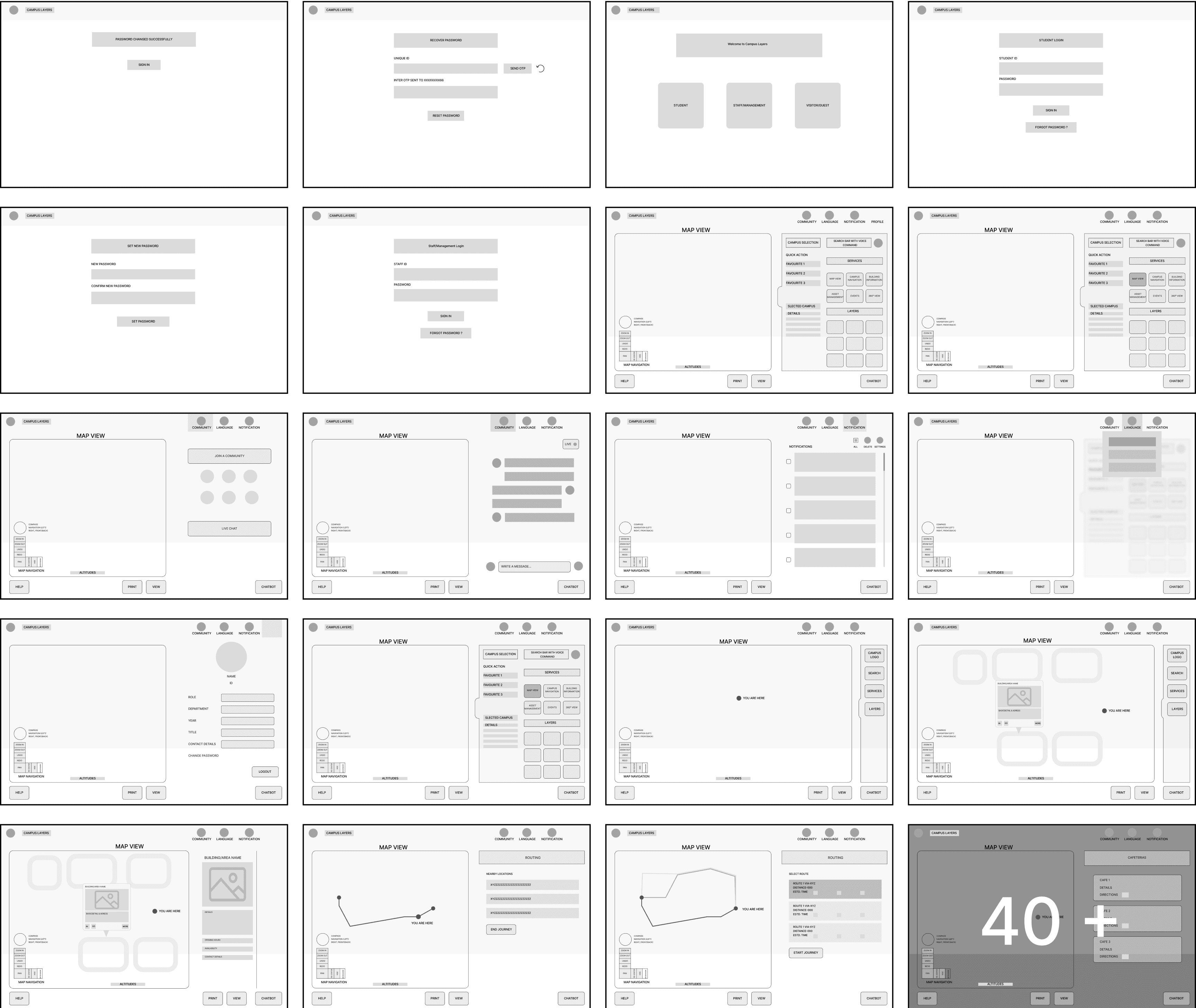
With a clear vision in place, we shaped the foundation of the workspace through wireframes. These structural blueprints defined the layout, navigation, and interactions, bringing the user experience into focus. This step ensured a seamless transition from ideas to a functional design, setting the stage for the final interface.
What are the Materials?
What are the Materials?
What are the Materials?
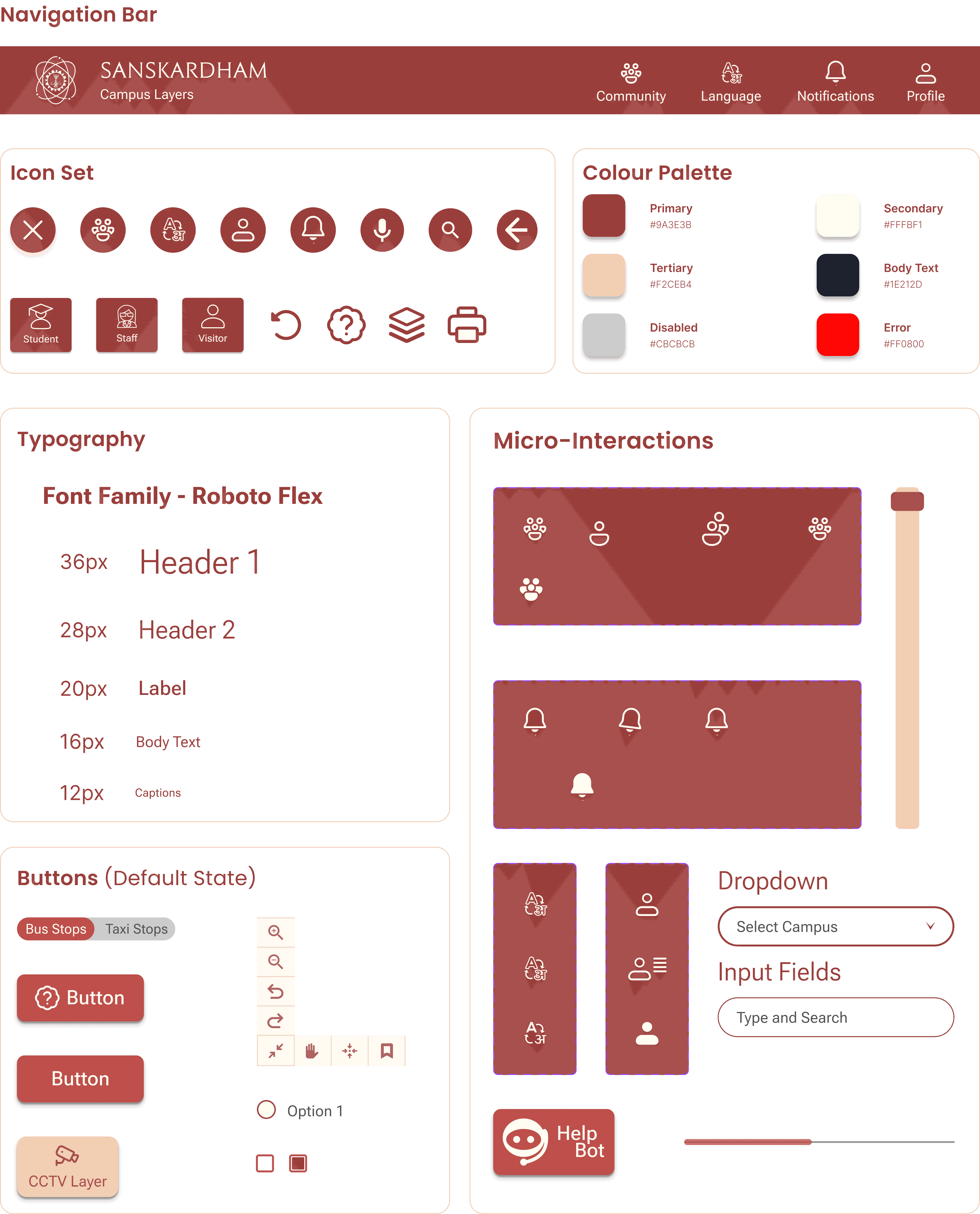
Here is the First version of the Building.
Here is the First version of the Building.
Here is the First version of the Building.
Compilation of all elements to make it functional and Test with Users
Compilation of all elements to make it functional and Test with Users
Login Page
Login Page
Login Page
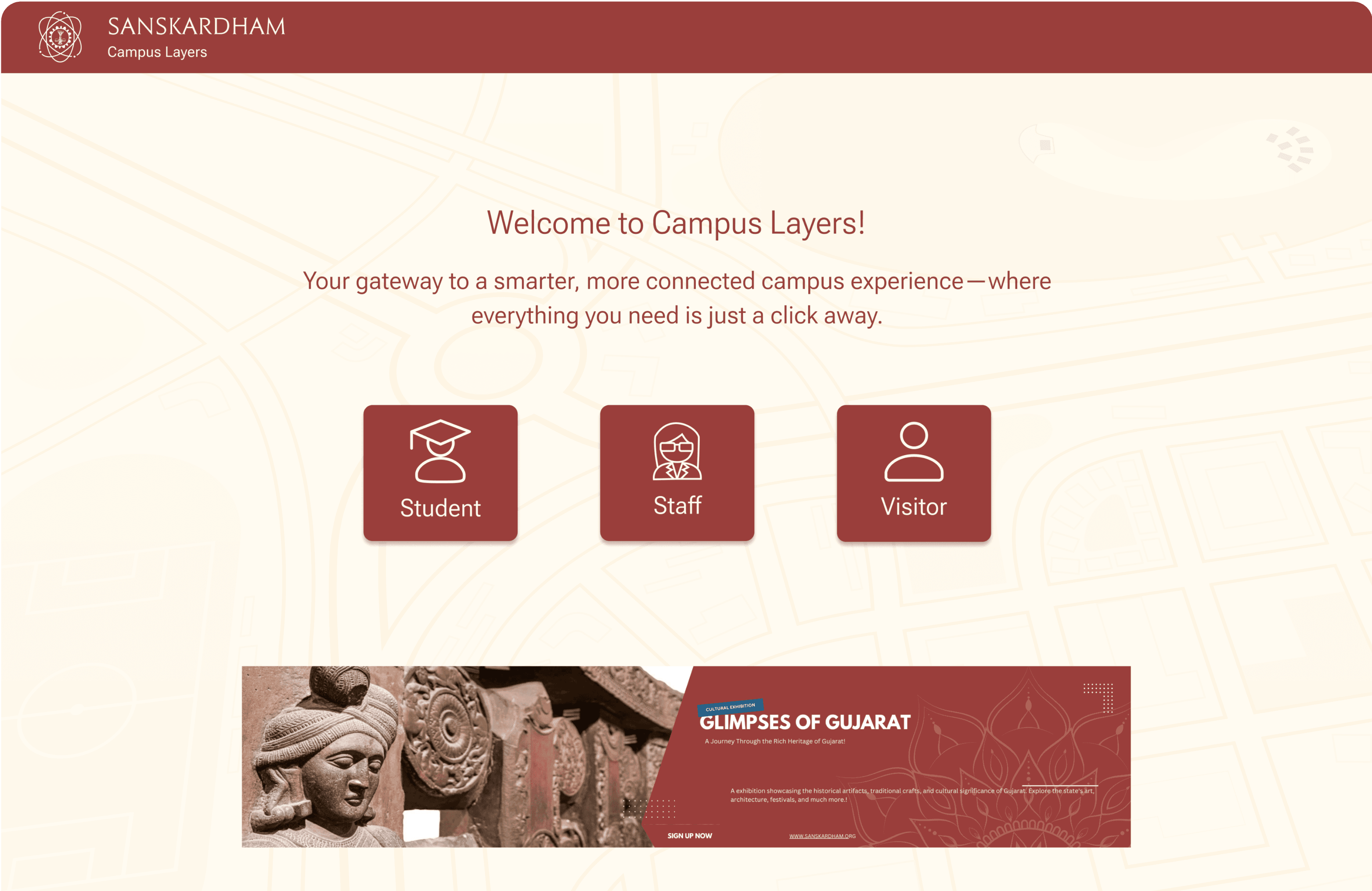
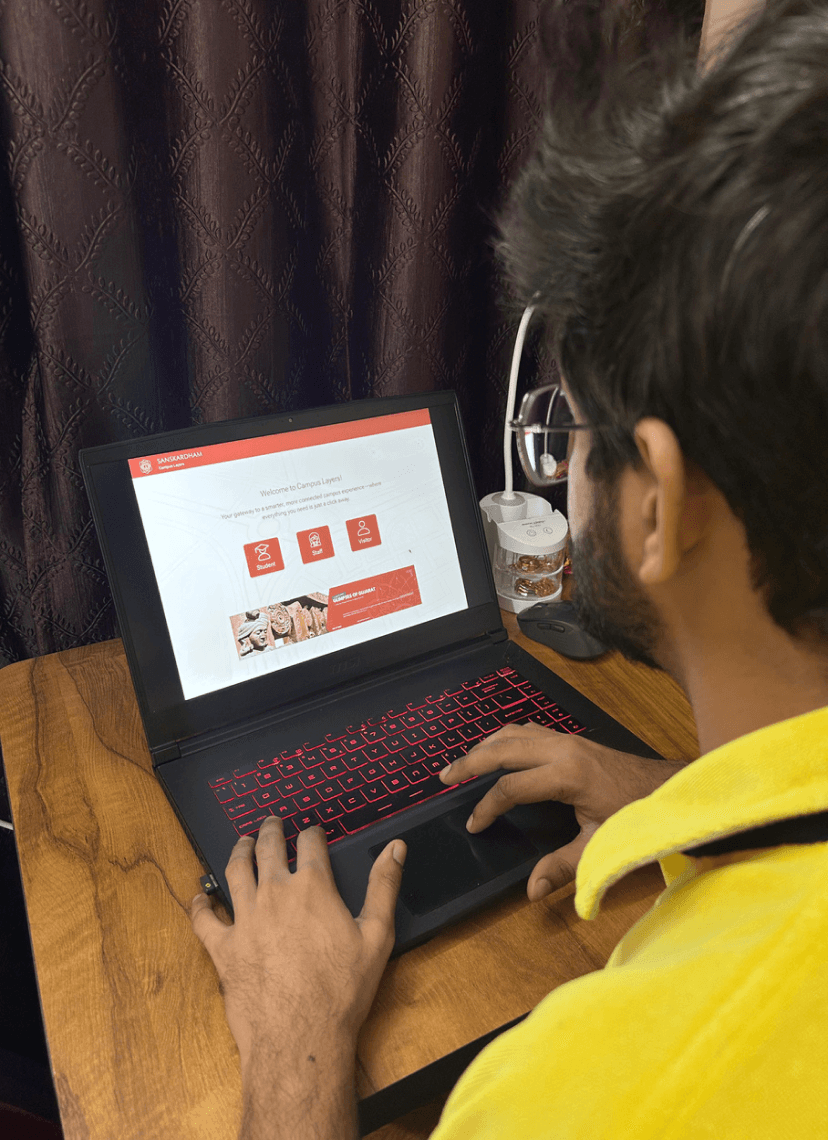
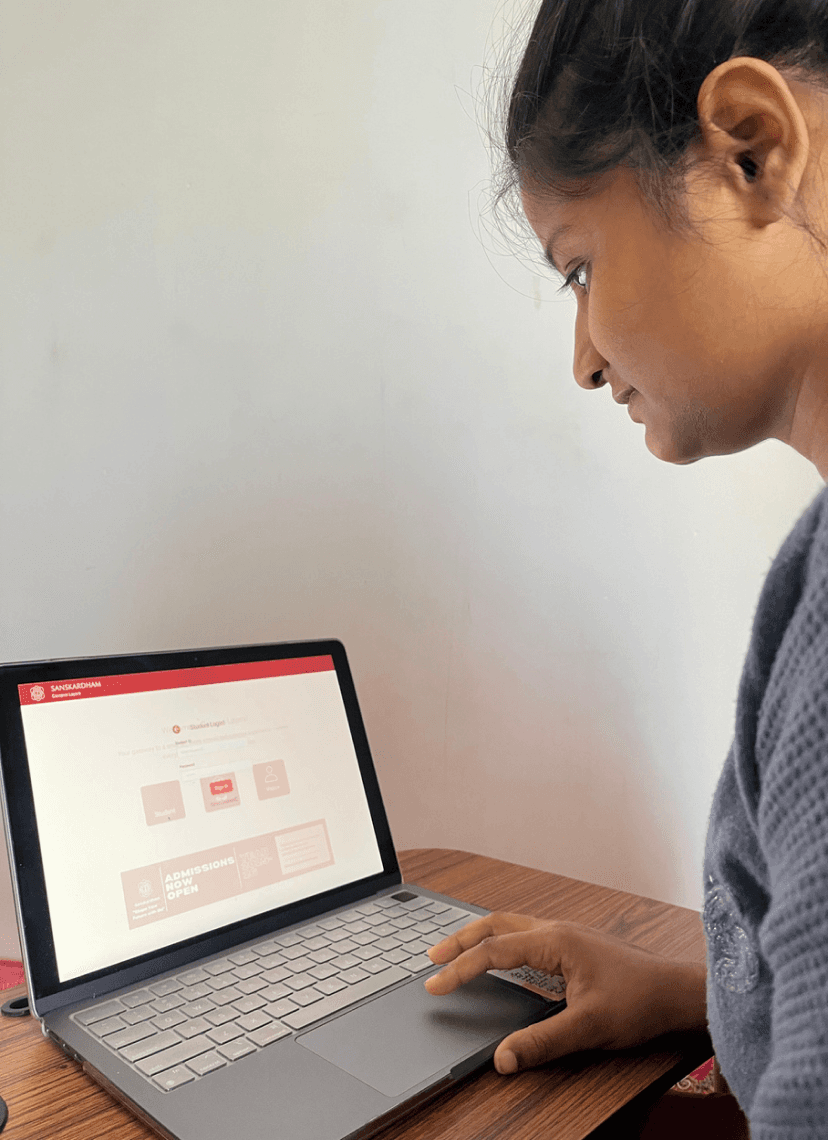
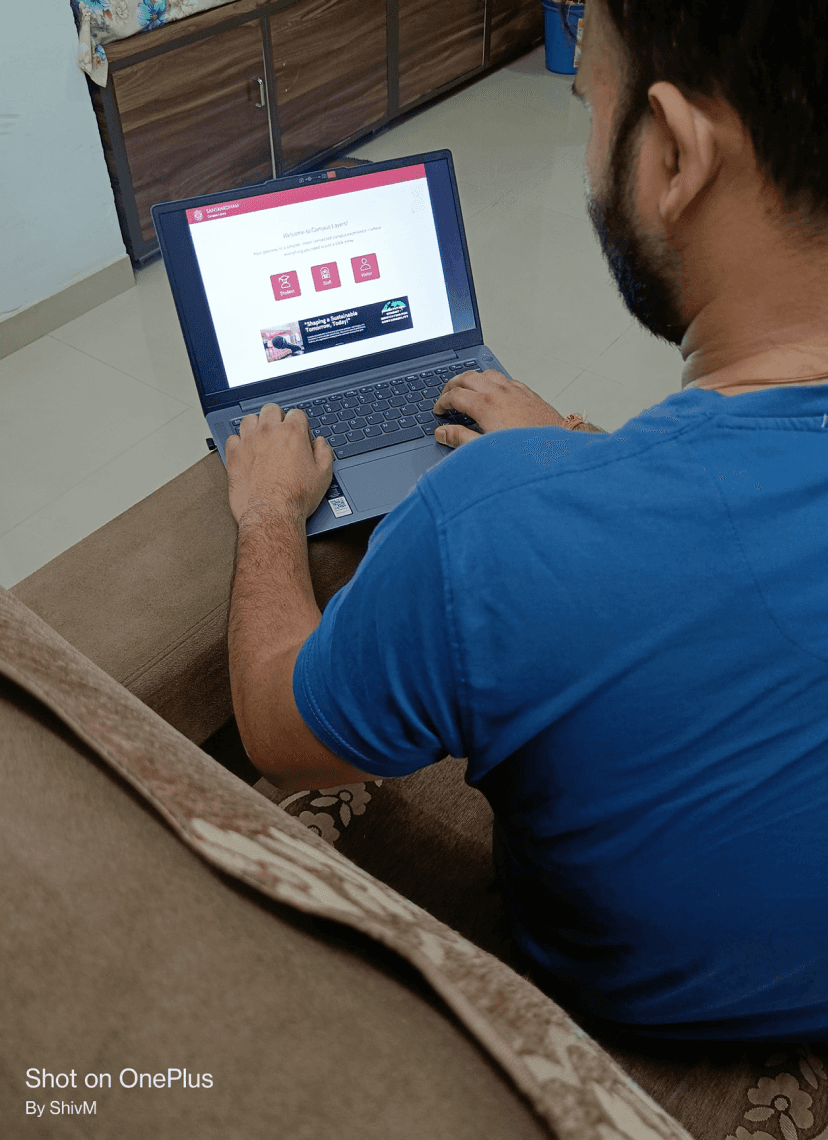
The login screen welcomes users with a role-based system designed to meet the unique needs of students, staff, and visitors.
To elevate convenience, a dynamic banner highlights upcoming events, allowing direct access with just a tap—making the platform intuitive, efficient, and tailored for all.
The login screen welcomes users with a role-based system designed to meet the unique needs of students, staff, and visitors.
To elevate convenience, a dynamic banner highlights upcoming events, allowing direct access with just a tap—making the platform intuitive, efficient, and tailored for all.
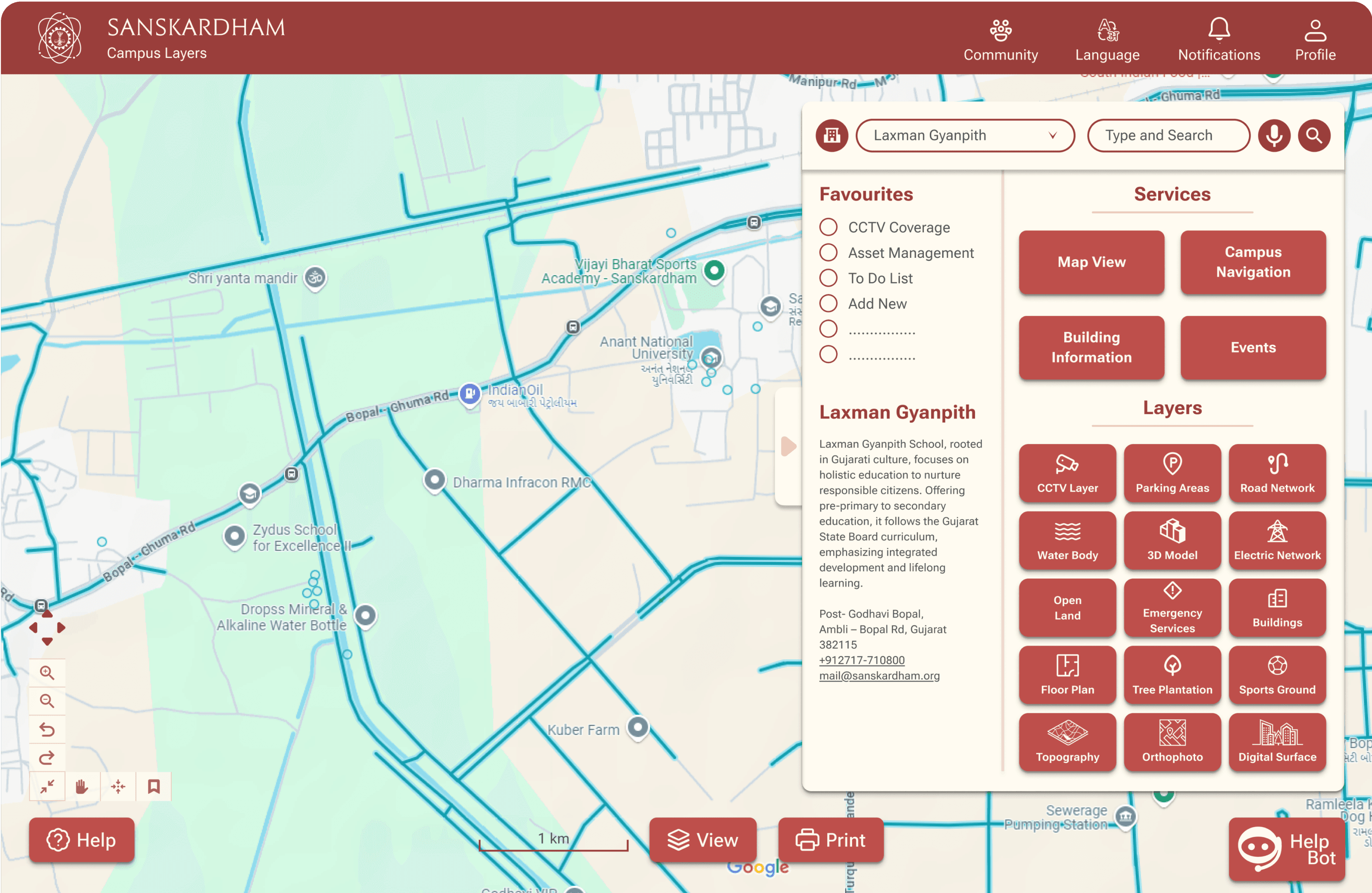
Dashboard Screen
Dashboard Screen
Dashboard Screen
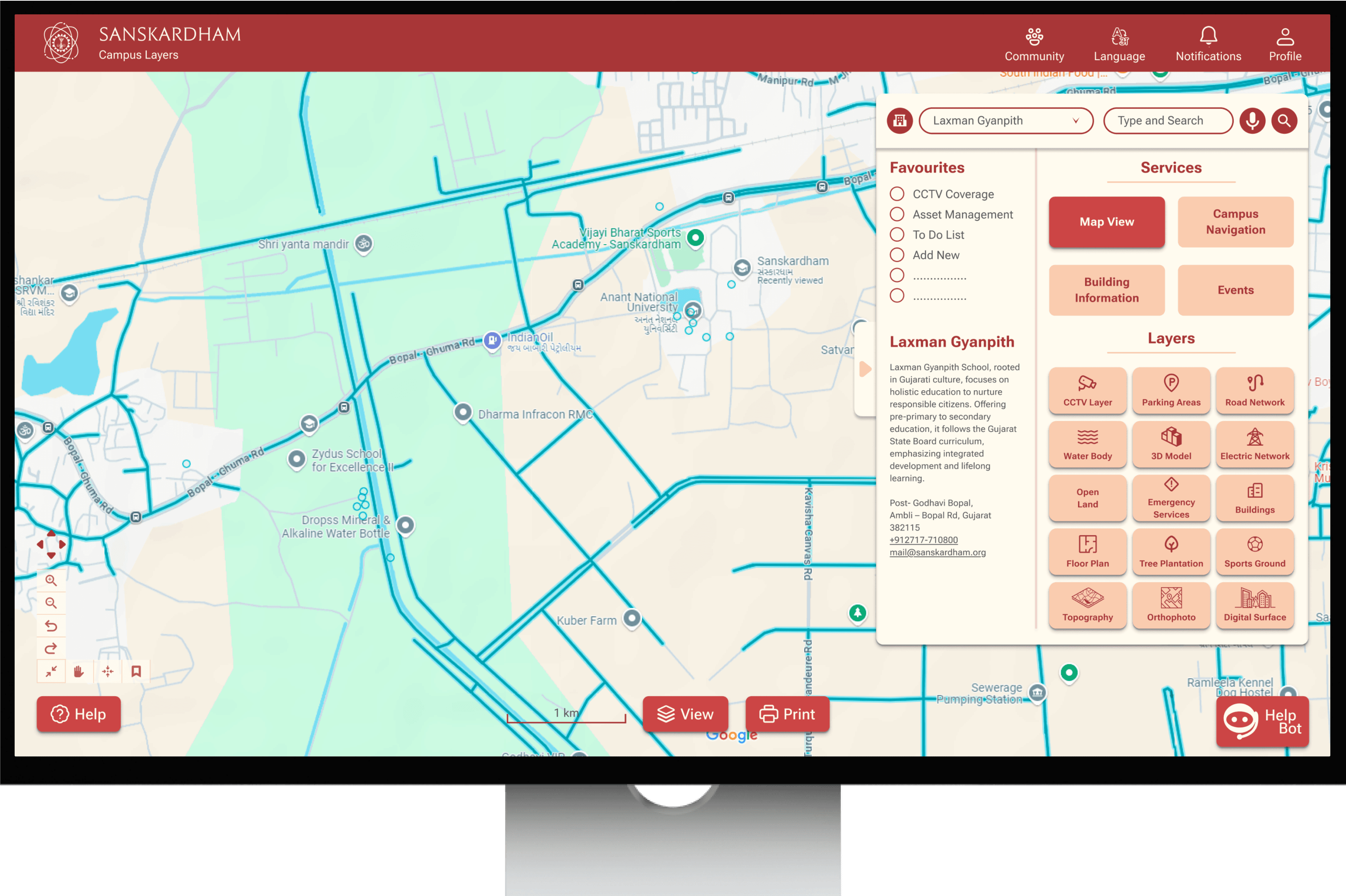
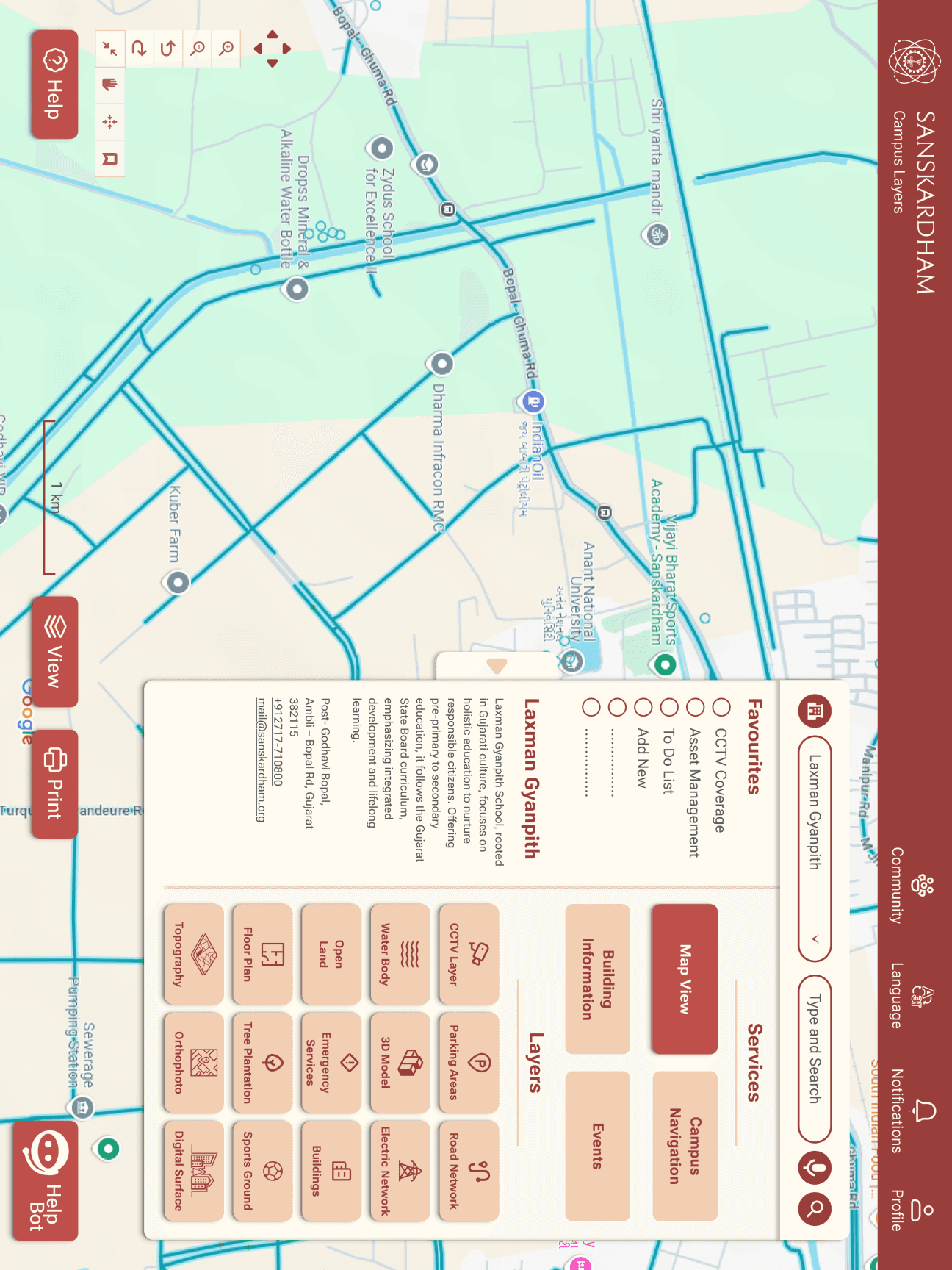
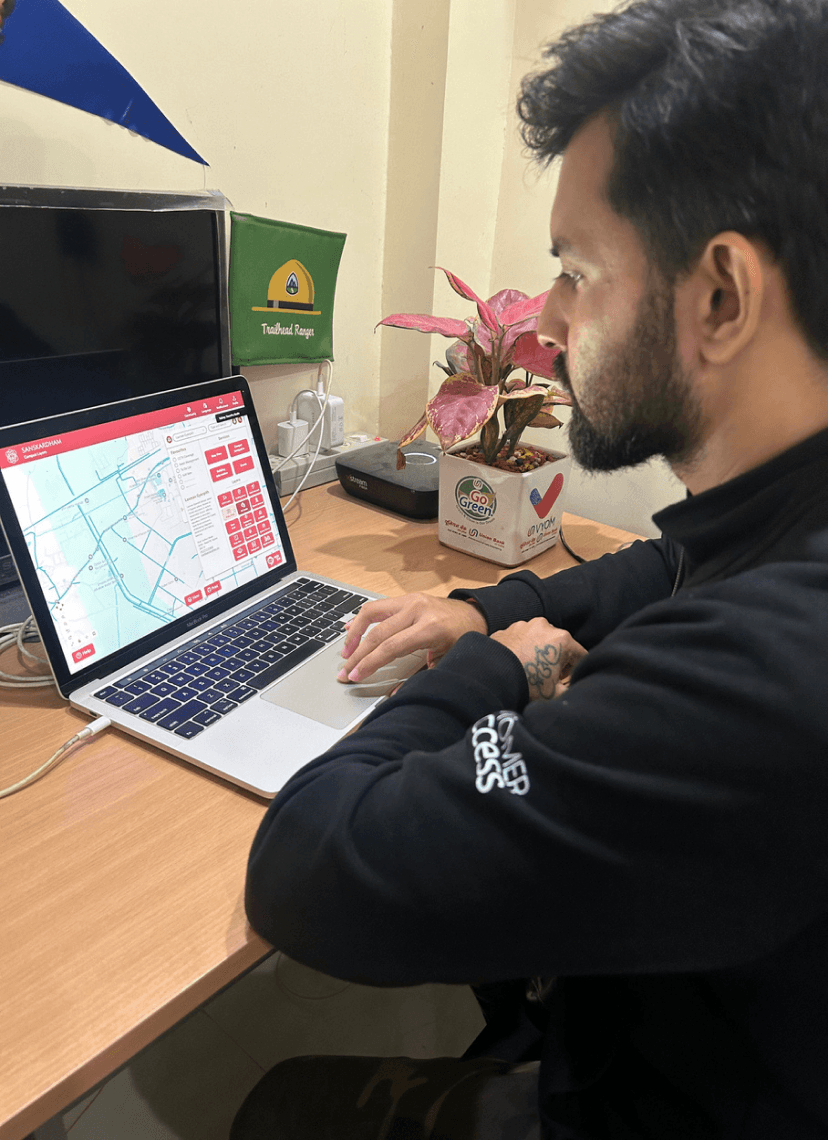
The dashboard serves as the central hub, offering quick access to tools, services, and key campus functions. It includes an interactive map, GIS layers for detailed exploration, and a chatbot for support, streamlining the campus experience in one user-friendly space.
The dashboard serves as the central hub, offering quick access to tools, services, and key campus functions. It includes an interactive map, GIS layers for detailed exploration, and a chatbot for support, streamlining the campus experience in one user-friendly space.
Building Information
Building Information
Building Information
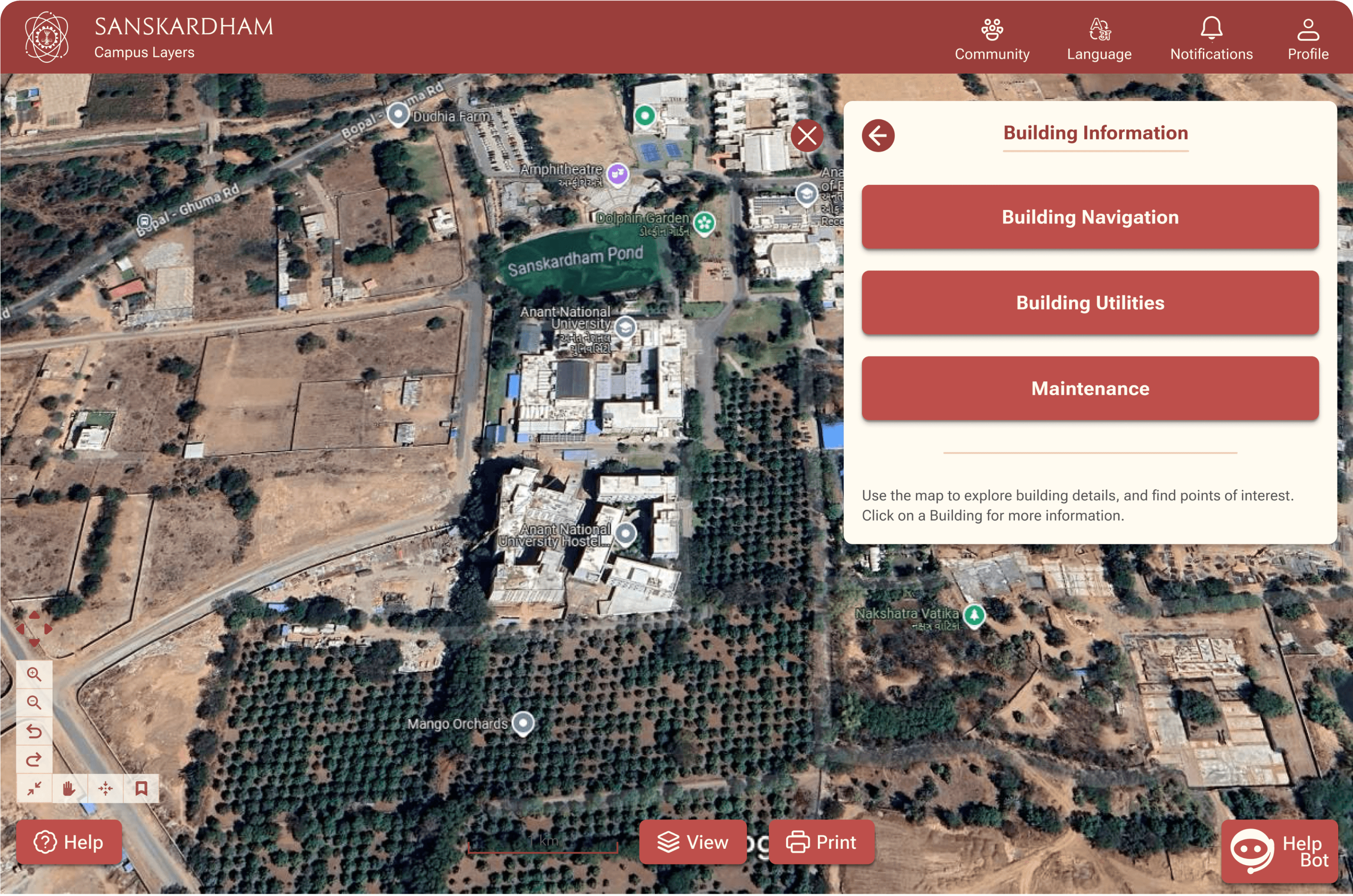
The Building Information screen centralizes details about campus buildings, including utilities, maintenance, and resources. It supports staff in managing facilities, ensuring smooth operations and providing comprehensive information to maintain a functional campus.
The Building Information screen centralizes details about campus buildings, including utilities, maintenance, and resources. It supports staff in managing facilities, ensuring smooth operations and providing comprehensive information to maintain a functional campus.
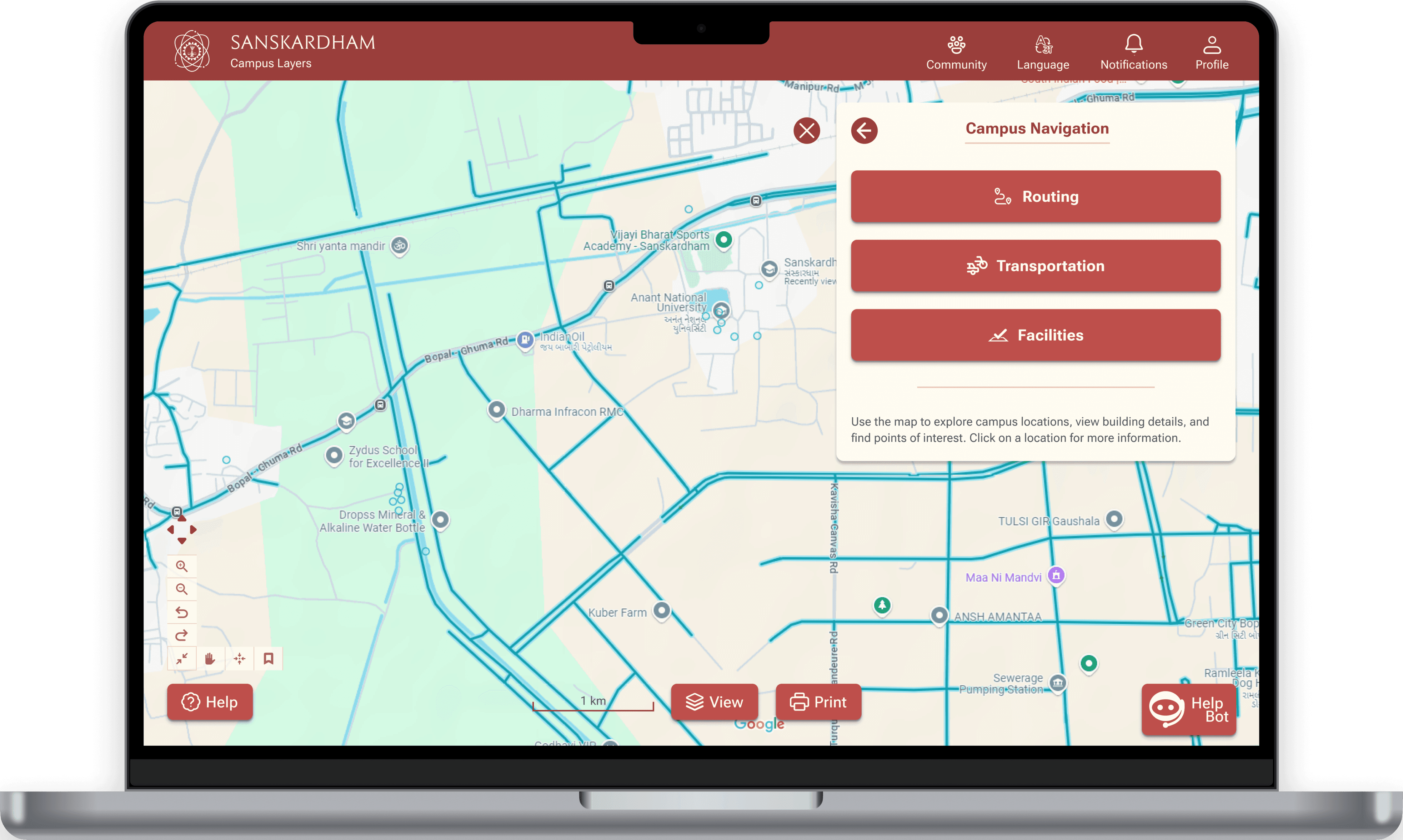
Campus Navigation
Campus Navigation
Campus Navigation
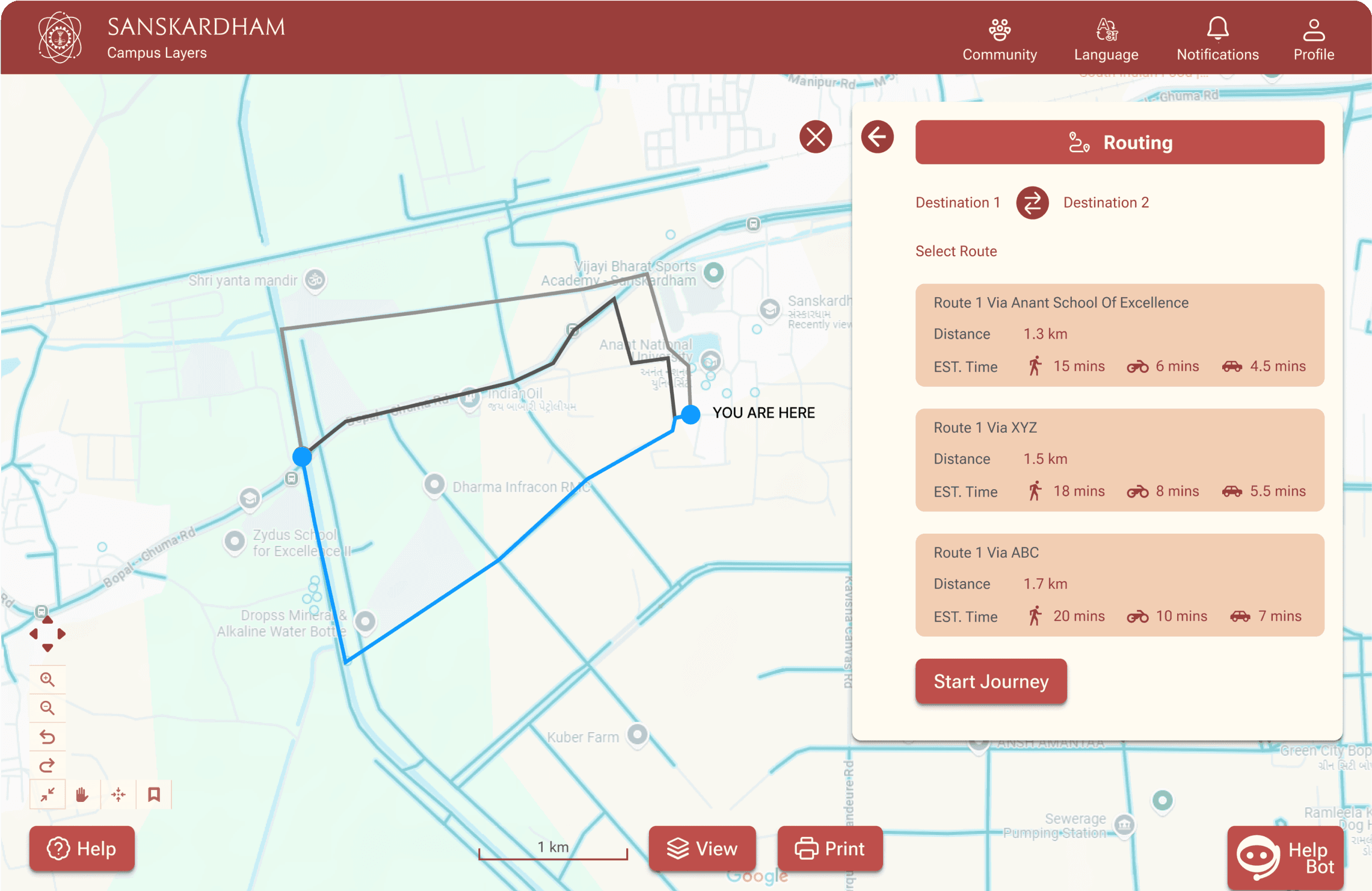
The Campus Navigation screen simplifies movement across campus by combining route guidance, transport options, and facility locations. It enhances navigation for students, staff, and visitors, saving time and effort
Events Management
Events Management
Events Management
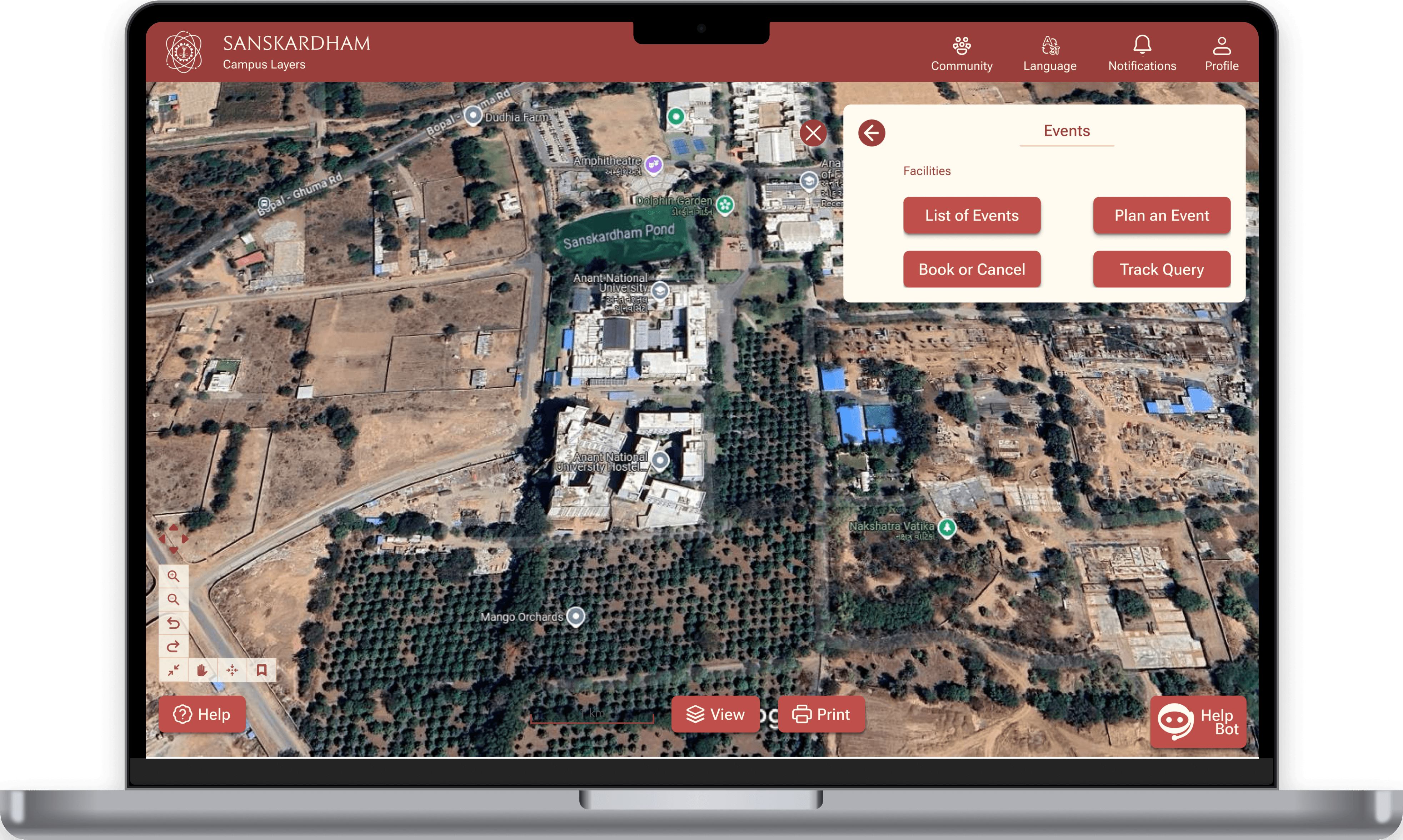
The Events screen provides a complete solution for managing campus events. Users can browse upcoming events, plan, book, or cancel reservations, and track event-related queries, streamlining event management.
The Events screen provides a complete solution for managing campus events. Users can browse upcoming events, plan, book, or cancel reservations, and track event-related queries, streamlining event management.
To - Do List
To - Do List
To - Do List
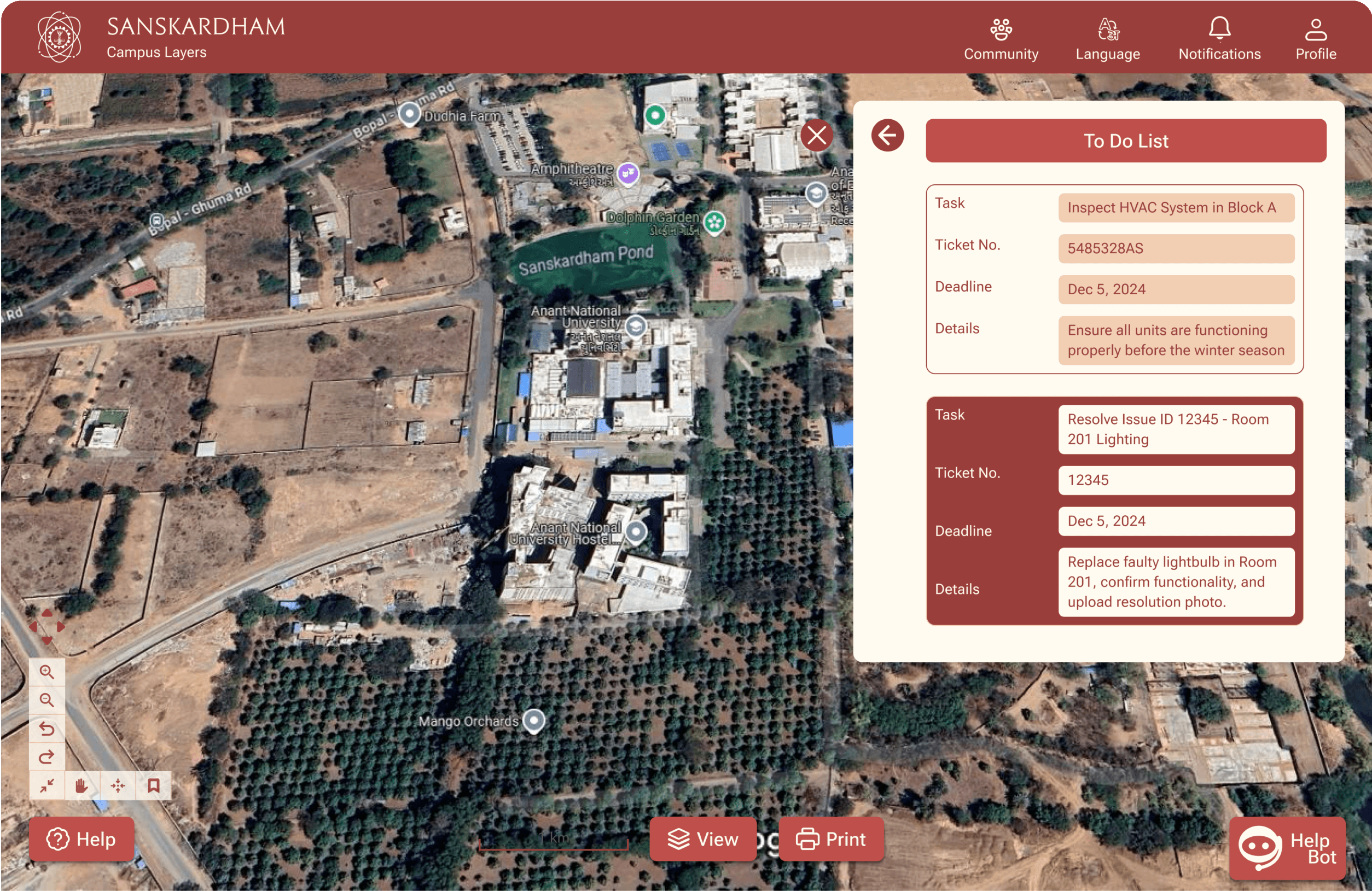
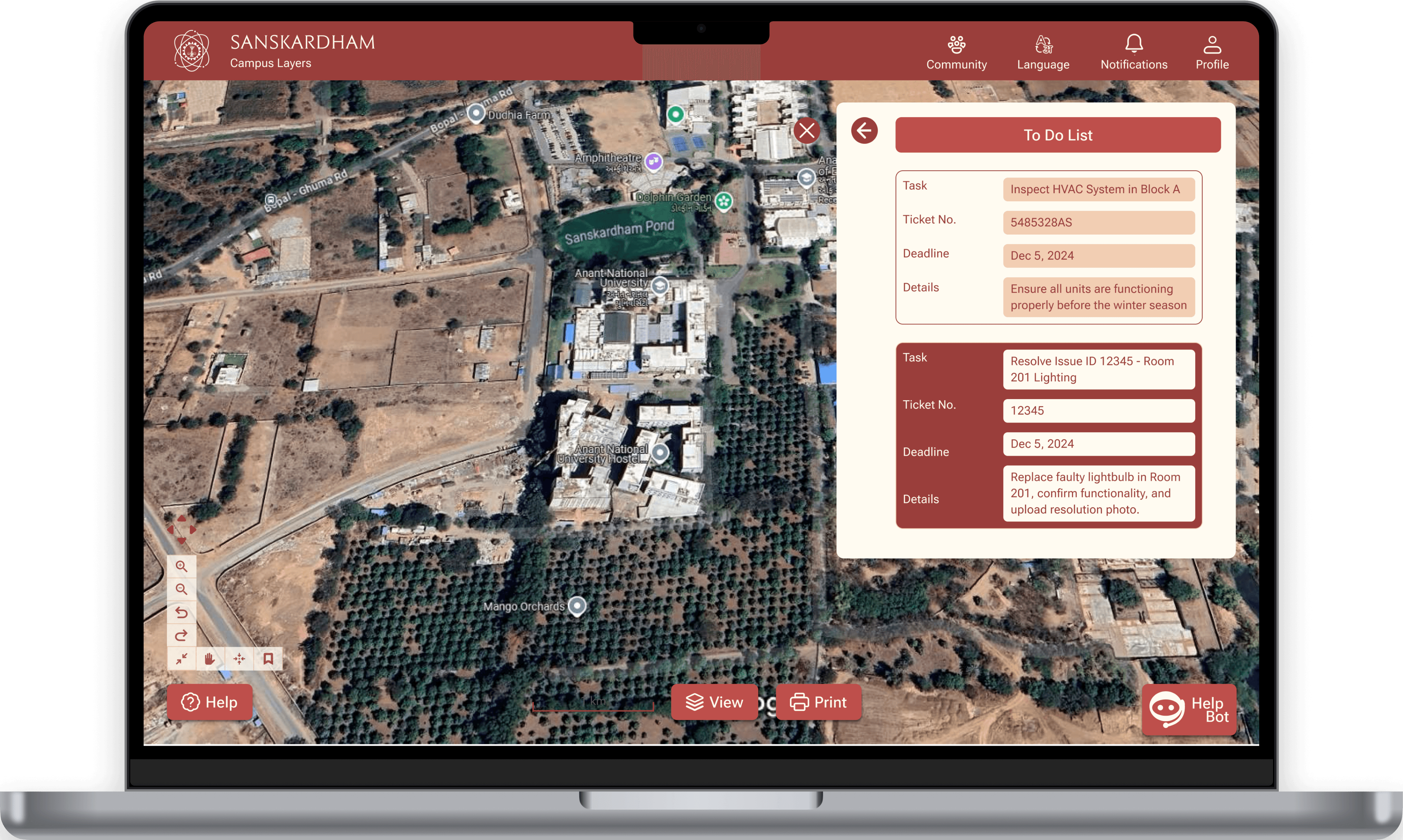
The To-Do List screen helps staff manage maintenance tasks. It allows users to view assigned tasks, track progress, and access key details like deadlines and ticket numbers, ensuring efficient task completion and organization.
The To-Do List screen helps staff manage maintenance tasks. It allows users to view assigned tasks, track progress, and access key details like deadlines and ticket numbers, ensuring efficient task completion and organization.
Feedbacks from the users after Testing...
Feedbacks from the users after Testing...
Feedbacks from the users after Testing...

Users suggested using tooltips or brief pop-ups for icons and features to explain their purpose without clicking.
Users suggested using tooltips or brief pop-ups for icons and features to explain their purpose without clicking.
Users suggested moving the to-do list to the header section or creating a dedicated widget on the home screen for better visibility.
Users suggested moving the to-do list to the header section or creating a dedicated widget on the home screen for better visibility.
A collapsible sidebar or a floating icon for quick access was also recommended.
A collapsible sidebar or a floating icon for quick access was also recommended.
Add a feature to create group tasks or event schedules for collaborative activities.
Add a feature to create group tasks or event schedules for collaborative activities.
Users expressed a need for an offline mode that includes pre-downloaded maps and basic functionalities.
Users expressed a need for an offline mode that includes pre-downloaded maps and basic functionalities.
Add a feature to create group tasks or event schedules for collaborative activities.
Add a feature to create group tasks or event schedules for collaborative activities.
Project Type
Industry Sponsored Live UX Research and Design Project
My Role
Project Planning
User Research
Ideations
Prototyping
Duration
3 Months
Tools Used